There are a surprising number of apps designed to solve the same problem: remembering which bin goes out this week. Some pull data directly from your council. Some let you set it up manually. One sends you a text message. And at least one charges you $49 a year for the privilege.
We've tested the main options available in Australia in 2026. For each one, we'll cover what it does, what it costs, what's good, and what's not. At the end, we'll also cover an option that isn't an app at all — because the best bin day reminder might be the one you never have to open.
1. What Bin Day
Type: Council-integrated schedule viewer
Price: Free (with A$1 in-app purchase for reminders, widgets, and multiple locations)
Platforms: iOS and Android
What's good: Clean interface. Pulls directly from council data for supported locations, so the schedule is always accurate. You can manually add your schedule if your council isn't supported yet. The $1 unlock is very reasonable.
What's not: Coverage is still limited. It supports around 20 councils including Sydney, Melbourne, Brisbane, Adelaide, and a handful of others, but large parts of Australia aren't covered yet. If your council isn't listed, you'll need to set up the schedule manually, which somewhat defeats the purpose. Some App Store reviewers also note it's quite a minimal app — you open it once a week for a few seconds.
Verdict: The best free option if your council is supported. Check the app first — if your area is listed, it just works.
2. Council-Specific Apps
Example: Brisbane Bin & Recycling
Type: Official council app with schedule and recycling guide
Price: Free
Platforms: iOS and Android (varies by council)
What's good: The data comes straight from the council, so it's as accurate as it gets. Brisbane's app is the gold standard — it includes personalised collection calendars, optional reminders, an A–Z recycling lookup, and information on drop-off facilities. Some other councils have similar offerings built into their main apps.
What's not: Only works for one council. If you move, you need a different app. Reminder features vary wildly — Brisbane's app only lets you set reminders for the actual collection day, which is useless if you need to put bins out the night before and you leave for work at 5am. Many councils don't have an app at all, and those that do often bury the bin schedule three screens deep.
Verdict: Check if your council has one. If it does and the reminders work for your routine, it's the most reliable source of data. Just don't expect polish.
3. Bin Reminder (SMS Service)
Website: binreminder.com.au
Type: SMS/email reminder service
Price: $49 per year
Platforms: No app — SMS or email delivered to your phone
What's good: No app to install or check. You get a text or email the night before collection telling you which bin to put out. Setup takes 30 seconds. The service handles public holiday schedule changes automatically. Very "set and forget."
What's not: It costs $49 per year, every year. That's a recurring subscription for a text message. Coverage is currently focused on Melbourne metro councils, so it's not useful if you're in Sydney, Brisbane, or regional areas. And like every notification-based system, it only reaches the person who signed up — the rest of your household is still guessing.
Verdict: Solid if you're in a supported Melbourne area and don't mind the annual fee. The SMS format is genuinely convenient — no app to open, nothing to check. But $49/year adds up.
4. Bin Day Alert
Type: Manual schedule app with flexible reminders
Price: A$2.99 (one-time purchase)
Platforms: iOS only (Apple Watch support included)
What's good: Extremely flexible scheduling. Supports weekly, fortnightly, every 3/4/5 weeks, and specific weeks of the month. You can set two alerts per bin type (day before and day of). Works with Siri shortcuts and Apple Watch complications. You can share your schedule with neighbours so they don't have to set it up themselves. Backup to iCloud. One-time purchase with no subscription.
What's not: It doesn't connect to any council data — you set everything up manually. That means you need to know your schedule already, and you'll need to adjust it yourself when public holidays shift things around. iOS only, so no good for Android households. It's also a purely personal tool — your housemate with an Android phone is on their own.
Verdict: The best manual option for iOS users who want fine-grained control. If you already know your schedule and just need reliable reminders, this is well-designed and worth A$3.
5. Oz Bin Mate
Type: Australia-focused bin reminder with location detection
Price: Free
Platforms: Android (iOS status unclear)
What's good: Built specifically for Australian councils. Supports multiple bin types with colour-coded reminders. Holiday adjustments built in. Location-based detection. All data stays on your device, which is a nice privacy touch. Free with no in-app purchases.
What's not: Relatively new and less established than What Bin Day. Coverage and accuracy will depend on how well it tracks your specific council's schedule. Android-focused, which may exclude iPhone users in your household.
Verdict: Worth trying if you're on Android. It's free, private, and purpose-built for Australian schedules. Test it for a few weeks to see if it matches your actual collection days.
6. DIY: Google Calendar or Apple Calendar
This isn't an app, but it's by far the most common approach. Set up a recurring event for each bin type: "Yellow bin — recycling" every other Tuesday, "Green bin" on the alternating week, general waste weekly. Add a reminder for 6pm the night before.
What's good: Free. Works on every device. You probably already have it. Once you get the alternating weeks right, recurring events handle it automatically.
What's not: Setting up alternating fortnightly events is surprisingly fiddly. Public holidays will throw it off and you'll need to manually adjust. It's personal to one account — sharing a calendar with your household is possible but adds friction nobody actually follows through on. And it's just another notification in a sea of notifications.
Verdict: The free default that most people end up using. It works, but it's fragile and it's easy to ignore.
Quick Comparison
| Option | Price | Coverage | Household? | Ongoing cost |
|---|---|---|---|---|
| What Bin Day | Free / A$1 | ~20 councils | Personal only | None |
| Council apps | Free | 1 council only | Personal only | None |
| Bin Reminder | $49/year | Melbourne focus | Personal only | $49/year |
| Bin Day Alert | A$2.99 | Manual setup | Personal only | None |
| Oz Bin Mate | Free | All AU councils | Personal only | None |
| Google Calendar | Free | Universal | Personal only | None |
| Bindicator | A$35 | Universal | Whole household | None |
Notice the pattern? Every app-based option is personal — it notifies one phone. Only one option works for every person in the house without anyone having to open anything.
The Option That Isn't an App
Every option above has the same limitation: it sends a notification to one person's phone. That person then becomes the household's unofficial bin coordinator — the one who has to tell everyone else, or more likely, just takes the bins out themselves.
This is the problem we kept running into before we built Bindicator. It wasn't that we didn't have reminders. We had three. The issue was that nobody else in the house saw them.
"The best reminder is the one nobody has to check. It's just there, visible to everyone, without anyone having to open an app, read a text, or remember to tell someone else."
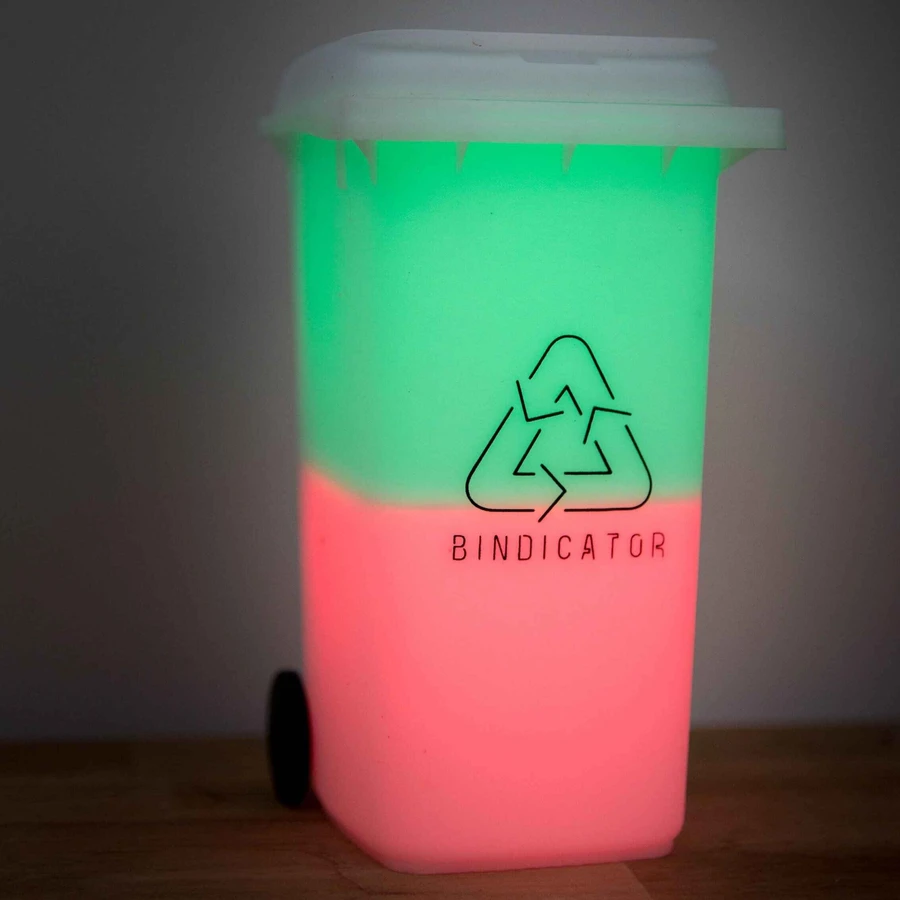
Bindicator is a small lamp that sits on your kitchen bench or hallway shelf. The night before collection day, it glows the colour of the bins that need to go out. No app to check after a one-time 2-minute setup. No subscription. No notifications to swipe away.
When someone takes the bins out, they tap the lid. The light switches off. Everyone else in the house now knows it's been handled — without a single word being spoken or a single message being sent.
It costs A$35 as a one-time purchase. That's less than one year of the Bin Reminder SMS service, and unlike every app on this list, it works for everyone in the household simultaneously.
So Which Should You Use?
It depends on your situation. Here's the short version:
- Your council is supported? Try What Bin Day. It's free, it pulls real data, and the $1 reminder unlock is a bargain.
- Your council has its own app? Check it out. Brisbane's is excellent. Most others are functional but clunky.
- You're in Melbourne and want zero effort? Bin Reminder's SMS service is convenient. Just know it's $49/year ongoing.
- You're on iOS and want total control? Bin Day Alert is the most customisable option for A$3.
- Nobody else in your house knows which bin goes out? That's a different problem. Apps can't solve it. A visible light the whole household can see — that's what Bindicator was designed for.